


In this article, we will explore the process of obtaining a salary certificate in Kuwait, highlighting the steps required for both online access through the Civil Service Bureau’s website and via the Sahel app. This guide aims to simplify the procedure, ensuring that employees can efficiently retrieve this essential document as needed.
Obtaining a Salary Certificate Online in Kuwait
Securing a salary certificate online through Kuwait’s Civil Service Bureau is a straightforward process that can be completed in just a few steps. Below is a detailed guide to help you through the procedure.
- Step 1: Navigate directly to the Civil Service Bureau (CSC) website by following this link.
- Step 2: Create a new user account by filling out the necessary registration details.
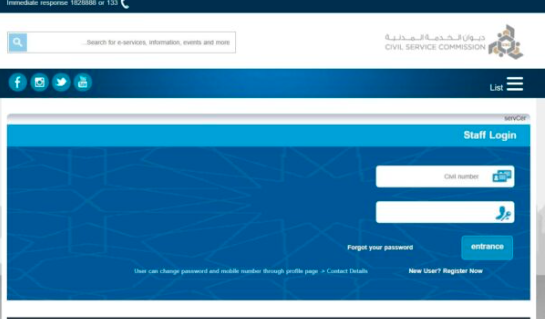
- Step 3: Log into your newly created account on the portal.
- Step 4: Access the certificate extraction service from your account dashboard.
- Step 5: Input the relevant information required for your salary certificate request and submit it.
- Step 6: From the list of certificate types, choose the appropriate salary certificate option.
- Step 7: Fill in all required data to finalize the extraction of the certificate.
- Step 8: Your salary certificate will then be generated, which you can download or print.
Visual Guide for Online Extraction
For better understanding, consider the following image that illustrates the online extraction process:
Accessing Salary Certificates via Sahel App
A convenient alternative to the online portal is the Sahel App, which allows users to obtain salary certificates directly on their smartphones. Below are the essential steps.
- Step 1: Download the Sahel App from your preferred app store here.
- Step 2: Launch the application on your mobile device.
- Step 3: Enter your civil ID number in the specified field.
- Step 4: Activate the “I am not a robot” option to complete the captcha verification.
- Step 5: Click on the Log in button.
- Step 6: Confirm the authentication request through the Kuwait Mobile ID app.
- Step 7: Follow the prompts to complete your registration inside the Sahel application.
- Step 8: Navigate to the Services section at the bottom of the app.
- Step 9: Select the Civil Service Bureau from the services list.
- Step 10: Click on Certificates, then select Inquire about Certificate.
- Step 11: Choose the salary certificate type from the available options.
- Step 12: Wait for the download to complete, then review your certificate.
Direct Link for Accessing Salary Certificates
To initiate your request for a salary certificate, you can go directly to the Kuwait Civil Service Bureau portal. Logging into your user account will lead you to the required document efficiently.
Conclusion
Securing a salary certificate in Kuwait has been made accessible through both the Civil Service Bureau’s online portal and the user-friendly Sahel application. By following the outlined steps, employees can effortlessly obtain this important document, streamlining the process for personal or professional needs.






