


In this article, we will explore the login process for the Kuwait University Moodle system, highlighting essential features and steps necessary for students and faculty members to access various electronic services seamlessly. Whether you are using the student information system or encountering difficulties such as forgotten passwords, this guide provides clear instructions to ensure a smooth experience in utilizing the Moodle platform effectively.
Moodle Access Procedures at Kuwait University
The Kuwait University Moodle platform serves as a vital resource for both students and faculty, providing a range of electronic services. Through the Moodle system, users can add exams, check results, and manage numerous academic activities online. Here, we will delve into the various methods available for accessing the Moodle system, ensuring that all potential users can find their way in easily.
Logging In with KU SIS Account
Step-by-Step Guide
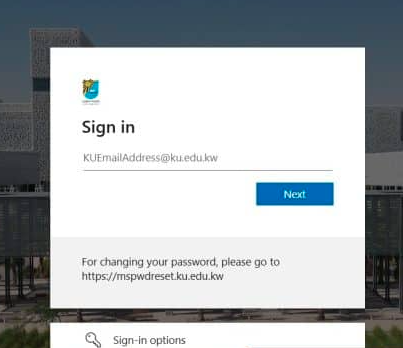
For those looking to log in using their KU SIS account, follow these straightforward steps:
- Step 1: Navigate to the Kuwait University Moodle platform via the following link: moodle.ku.edu.kw.
- Step 2: Select the option for logging in with your KU SIS credentials.
- Step 3: Enter your university email address in the designated field.
- Step 4: Click on the Next button.
- Step 5: Input your password and then click on the Login button to access your account.
Logging In as a Local User
Process Overview
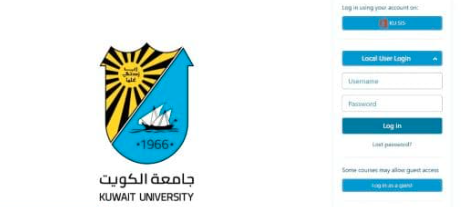
To access the Moodle system as a local user, adhere to the following instructions:
- Step 1: Visit the Kuwait University Moodle platform at this link.
- Step 2: Click on the Local User Login button.
- Step 3: Enter your username in the specified field.
- Step 4: Input your password in the provided space.
- Step 5: Hit the Log in button to proceed to your user account.
Accessing Moodle as a Guest
The Moodle platform also enables guest access, albeit with limited features. To log in as a guest, follow the steps outlined below:
- Step 1: Go to the Kuwait University Moodle site here.
- Step 2: Click on the guest login option.
- Step 3: Select the Log in as a guest button.
- Step 4: Enjoy the limited range of services accessible to guests.
Resetting Your Password
If you have forgotten your password, you can easily retrieve it by following these instructions:
- Step 1: Access the Kuwait University Moodle platform at this link.
- Step 2: Click on the Local User Login button.
- Step 3: Choose the Lost password link.
- Step 4: Enter your Username or Email address, depending on your preferred search method.
- Step 5: Click on the Search icon.
- Step 6: Follow the subsequent steps to recover your password, and then return to the login page.
- Step 7: Re-enter your credentials to access your account.
Direct Link to the Moodle Platform
Users can directly visit the main login page for Kuwait University Moodle using the following link: moodle.ku.edu.kw. This link facilitates immediate access to the platform and allows users to benefit from the various services available through their accounts.
Conclusion
The Moodle login service at Kuwait University provides a comprehensive platform for students to engage with their academic resources efficiently. By understanding the various login methods and recovery options, users can navigate through their educational activities with ease, enhancing their overall learning experience.






