


In this article, we will explore booking appointments for the civil ID through the Meta platform, highlighting the steps necessary to streamline the process and minimize waiting times at the Public Authority for Civil Information centers. This method ensures convenience, allowing users to efficiently manage their appointment needs without unnecessary delays.
Understanding the Meta Platform for Civil ID Appointments
The Meta platform offers users a straightforward method for scheduling appointments to collect their civil ID cards. By utilizing this online service, individuals can avoid the often lengthy process of waiting in line at physical locations. Following a series of simple steps, users can easily secure an appointment and ensure a timely collection of their civil ID.
Steps to Schedule an Appointment for Civil ID
Booking an appointment on the Meta platform is a user-friendly experience. Below are the comprehensive steps to follow:
- Step 1: Navigate to the Meta platform via this link: Meta Portal.
- Step 2: Input the necessary details in the specified fields.
- Step 3: Click the “Log in” button to access your account.
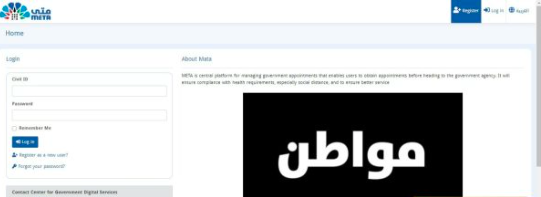
- Step 4: Select the option labeled “Search for services.”
- Step 5: Click on the icon representing the Public Authority for Civil Information.
- Step 6: Choose the “Services Categories” option that appears.
- Step 7: Select the “Services” category specifically for the Public Authority for Civil Information.
- Step 8: Identify the branch of the Public Authority for Civil Information where you wish to book your appointment.
- Step 9: Proceed by clicking “Next.”
- Step 10: Select whether you prefer a “Morning or Evening” appointment.
- Step 11: Click on the “Submit” button to confirm the center where you will receive the service.
- Step 12: Browse the tabs for available days to check for open appointment slots.
- Step 13: Choose your desired date from the available options.
- Step 14: Click the confirmation icon to finalize the appointment.
- Step 15: Access the “My Appointments” menu located on the right side of the interface.
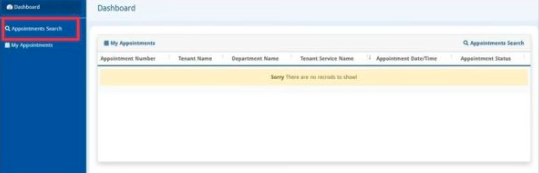
- Step 16: Verify that your newly scheduled appointment is reflected in your appointment list.
- Step 17: Print the appointment details to present during your visit to the center.
Checking Your Civil ID Appointment
If you need to confirm your scheduled civil ID appointment, follow these easy steps:
- Step 1: Access the Meta platform through this link: Meta Portal.
- Step 2: Log into your personal account with your credentials.
- Step 3: Click on “Log in.”
- Step 4: Navigate to the “My Appointments” section.
- Step 5: Ensure the civil ID appointment is displayed on your list.
- Step 6: Click on the specific appointment to see the comprehensive details.
Changing Your Civil ID Appointment
Should you wish to alter your existing appointment, follow these steps:
- Step 1: Visit the Meta platform using this link: Meta Portal.
- Step 2: Enter your login information to access the platform.
- Step 3: Click on “Log in.”
- Step 4: Proceed to the “My Appointments” area.
- Step 5: Select the civil ID appointment you wish to modify.
- Step 6: Click the icon to cancel your selected appointment.
- Step 7: Confirm your cancellation request.
- Step 8: Select “Search for services” to initiate booking a new appointment.
- Step 9: Locate “Services Categories” under the icon of the Public Authority for Civil Information.
- Step 10: Complete the procedures for scheduling a new appointment.
Cancelling Your Civil ID Appointment
To cancel a scheduled appointment, you can follow these steps:
- Step 1: Go to the Meta platform through this link: Meta Portal.
- Step 2: Log in using your account credentials.
- Step 3: Click on the “Log in” button.
- Step 4: Select “My Appointments” from the options displayed.
- Step 5: Find and click on the appointment you wish to cancel.
- Step 6: Click the cancel icon to process your request.
- Step 7: Confirm the cancellation of your appointment.
Accessing the Meta Portal for Civil ID Appointments
You can easily book your civil ID appointment via the government’s Meta platform by accessing it through the following link: Meta Portal. Log in, and follow the outlined steps to navigate through the booking process seamlessly.
Conclusion
Utilizing the Meta platform for scheduling civil ID appointments simplifies the process significantly. By adhering to the outlined steps, individuals can efficiently manage their appointment needs, leading to a smoother experience when collecting their civil ID cards. This system minimizes waiting times and facilitates a more organized approach to essential governmental services.






